

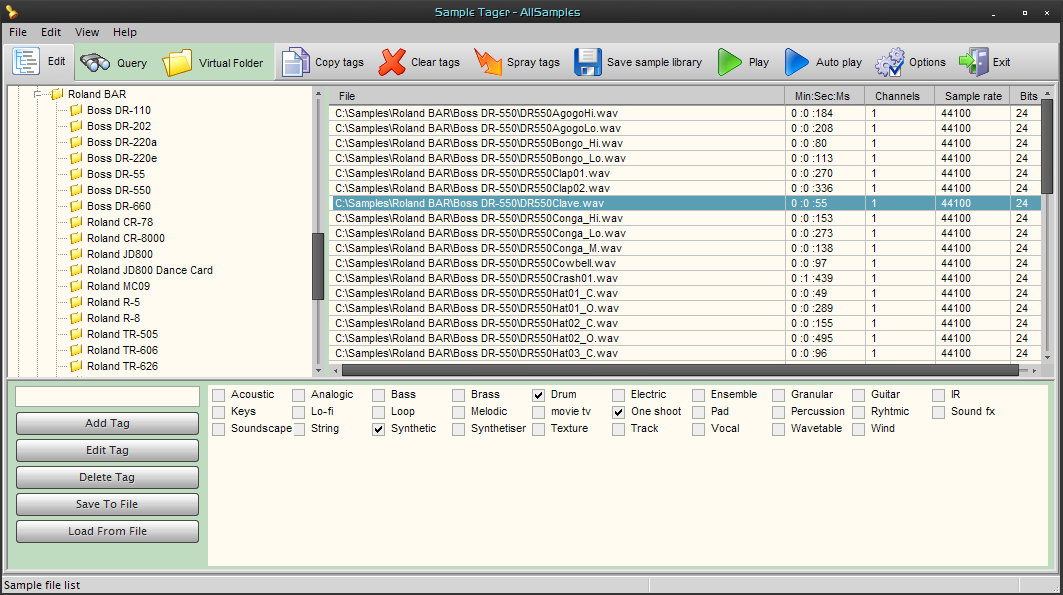
AZ Audio has released SampleTagger, an audio sample cataloging software for Windows systems.
SampleTagger can be used as an audio file explorer or as a serious cataloging tool.
SampleTagger features
- Clean user interface build around three tabbed views and two tag panels.
- Classic explorer view with a list synced to a tree.
- File scanner with variable scanning depth.
- Tagging system using 255 user-defined tags.
- Audio preview of *.wav, *.aiff, *.flac,mp3.
- Support for these file formats, including *.mid.
- Virtual folders view with lists used to hold bookmarked items.
- Tag editing routines(copy, paste, overpaste, clear, spray) working on multi- item selection.
- Contextual taging and various contextual actions depending on the activeview.
- Item searches using logical tag filtering routines (AND inclusive, AND exclusive, OR).
- Single string searches and dual string searches(AND, OR, AND NOT).
- Random item picker to make unusual sample selections.
- Support for file drop to another application.
- Various application settings allow to change the performances, the behaviour or the
look of the software. - Save,load library files, maintenance of the library.
- Complete menu reference and advanced description of the application in a pdf document.
- Customisable toolbar.
SampleTagger is currently in a final beta stage and is distributed as donationware for Windows PC.
Visit AZ Audio for more information.



