

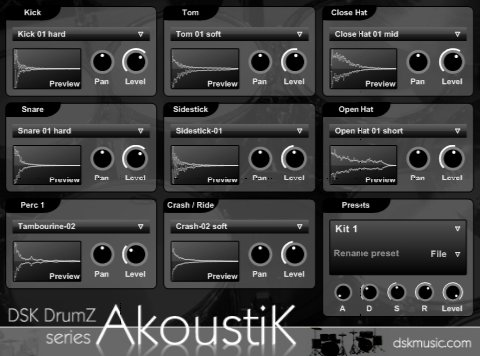
DSK releases DrumZ AkoustiK
DSK Music has released DrumZ AkoustiK, a freeware acoustic drums rompler VST instrument for Windows PC.
DrumZ AkoustiK features
- 8 sound slots (C3 to C4 white keys).
- Level and pan control.
- Master amp. envelope (ADSR).
- 8 stereo outs.
- 85 high quality samples.
- 4 full kits + extra sounds.
- Midi automation.
- Velocity response.
- Preset selector.
You can download DSK DrumZ AkoustiK (8.0MB) and a demo mp3 below.
DrumZ AkoustiK demo Downloads: 895 times
DSK DrumZ AkoustiK Downloads: 12009 times
Note: this plug-in uses multiple outputs. You may need to route the outputs to 1 & 2 in your host software to get the sounds to play.
Check the DSK VSTi page for more free plug-ins from DSK Music.

Loopmasters releases Funk Guitars
PowerFX releases All Them Beats

pretty clever sample managing, given the low file size and the quite convincing audio demo (didn’t try the software yet).
it probably won’t beat greedy professional drum modules nor hungry large loops libraries, but it sure makes a handy first go tool at the composition stage.
loads ok, but no sound when i play MIDI or click the drum pads….
SONAR 7 Producer Edition
Hi Joseph, did you read the note about multiple outputs? You might need to configure the plug-in to be routed to your output 1&2 when inserting the plug-in in Sonar.
Oops…
Actually i read it but while downloading & installing, i totallu forgot about it…
It works now… & BTW…. sooo lovely, small, light & useful…
Hi friends your vst is very nice!
how do i route this to outpout 1 & 2 in ableton ?
thnx for the great vst’s love the strings
peace
I’ve downloaded it, installed it.
But I’m still unable to use it in Logic Audio Paltinum… I tried to route the multi outputs, with absolutely no success.
Any help ?
Thanx for your work guys !
Hi, I don’t know what does “route to output 1&2″ mean, but I use MU.LAB, where there is a new button here: Connect Alternative Outputs. When I press it, I can connect 8 things: “L1+R1″, “L2+R2″, and so on, to different outputs, but only to Racks.
Now I tried to connect it a lot of ways, but I hear only open hat and tom, very softly. I used a MdspCompressor effect to amplify, now it’s a bit louder, but still very ugly. Crash and stick are still quiet. Here I have to wait a lot to hear anything. And I can hear the notes only when clicking in the VST window. Using the white keys C3-C4 makes no sound.
The demo mp3 was very nice, but it’s not too easy to get it working…
Sorry ADMC & Jef, I don’t know these hosts well enough to help you out.
@Sjon: check this comment about routing in Ableton Live: http://rekkerd.org/dsk-release.....ment-19696
Hi
Ive downloaded the Drumz akoustik plugin but when I click on the file it just shows a load of computer text and theres no other options really. Has this happened to anyone else?
Looks like your browser wants to show the download file instead of downloading it.
When the computer text is fully loaded you could still save the file (File -> Save page as, choose text file, save as DSK_DrumZ_AkoustiK.zip).
Or try a different browser perhaps.
Ok thanks alot il try that
Still can’t get this to work… :( I’ve selected alternate routing - i.e. to analogue 1 + 2 - but no joy. Can you fix this? ….
I think i have figured this out for mu.lab - i’m just starting out but it looks like this is what you do
1. Assign AkoustiK to Rack A
2. Using “Connect Alternative Outputs” send L1 + R1 to Rack B, and L2 + R2 and continue on until all the L’s and R’s are sent to Rack B
3. In Rack B send the Audio Back to Rack A (this may not be necessary but it is what I am doing right now, and I’m getting all 8 sounds when i press keys c1-c2 in the track Rack A is assigned too)
Now i think theoretically you can assign each sound to a separate rack, so kick could be A, snare B etc, so from 1 track you could program all 8 drum sounds but have 8 separate outputs, or a combination. I haven’t tried this yet as it’s late and i’m tired but i’ll try and post after i come to a conclusion.
Er… Loved the demo, it’s absolutely brilliant. I couldn’t believe you could get sounds like that for free…
So excited to try it on my songs.
Except that in my composition soft, Cubase 4 , I get no sound. At all.
And I think by now I tried everything possible.
An idea anyone?
I have to say this isn’t gratuitous criticism. It’s just that it’s so damned frustrating !!!!
