

rekkerd.org - download high quality creative and original royalty-free samples and loops and keep informed about the latest VST plug-ins and software

Terry West releases Take1

Terry West Take1

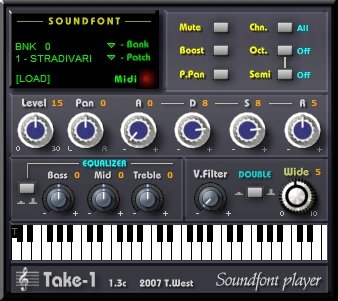
Terry West has released Take1 VSTi version 1.3c, a freeware soundfont player.

Take 1 features

  • Playback of sf2 Soundfont files
  • Preview keyboard
  • Midi receive channel selectable
  • Level, pan
  • Solo and mute
  • Octave up/down
  • Semitone up/down
  • Volume boost
  • ADSR controls
  • Three band equalizer
  • Double effect for widing the signal
  • P.Pan function. (pitch as pan)
  • V.Filter function. (vel. controlled filter)
  • Midi automation
  • Can load huge sf2 files (more than 200 mb)

Take1 was programmed in SynthEdit and CPU optimized. (Multilayer soundfonts are currently not supported)

Download the latest version of Take1 below. A standalone (Savihost) version is included.

Take1 v1.4 Downloads: 3473 times

Version 1.3c is still available here (2459 downloads)

9 Comments

  1. Parimal commented on Aug 12, 2007

    Not yet used but my friends of MOKAM have reported that it will work professionally. Let me try first.

  2. soheil commented on Aug 19, 2007

    salam

  3. Chlore commented on Sep 21, 2007

    really usefull if you looking for smthg original

  4. elias commented on Oct 02, 2008

    Hey! I I’ve downloaded it and extracted it to the vst plugins. I think its the right way. But I dont get any sound from it.
    Any suggetstions?
    Thanks!

  5. ronnie commented on Oct 02, 2008

    Hi Elias, what soundfont did you load in Take1? If none, then that would be the problem ^_^

  6. elias commented on Oct 02, 2008

    Well, I tried clicking on the piano keys on the plugin with default but then I also tried them all. But the same thing. I dont know.. My other plugins work normaly. Should I download it again?
    Thanks Ronnie!

  7. beatman commented on Oct 03, 2008

    I noticed you didn’t mention whether you’ve loaded a SF2 file into the player?

    Ignore the following statement if you already know this: This plug-in, doesn’t make any sound on it’s own. you must load a sf2 file into
    it to get any sound! Also, it can’t play a multi-layer sf2 file. Those types of files simply won’t load. Did you load any files into the player? If so… make certain they’re not multi-layered. This plug is only good for simple (1) layer sf2 files.

  8. elias commented on Oct 05, 2008

    Hi! Thanks for your replies! Well, no I havent loaded any files cos when I go to load fonts or something from the dropdpwn menu, the folder that opens is empty. There is nothing there as a soundfont or anything. There are some presets in the preset menu but they dont worke either.

    I dont know!

  9. ronnie commented on Oct 05, 2008

    It’s a soundfont player, so in order to play any sounds you’ll need to have some soundfonts to load in Take1.

    Check these places for soundfonts:

    http://www.hammersound.com/cgi-bin/soundlink.pl
    http://soundfonts.homemusician.net/
    http://www.sonivoxmi.com/FreeS.....=Soundfont
    http://www.soundfonts.it/?a=soundfonts

    Make sure to get sfArk as well because you’ll probably need to unpack some of these downloads (The last link above, SoundFonts.it, has sfArk on the download page as well)

Leave a comment

Comment notes:
Please keep comments relevant. Inappropriate or offensive comments may be edited and/or deleted. Email addresses are never displayed. Line breaks and paragraphs are automatically converted - no need to use <p> or <br/>.

* Your email address will not be published.

Keep reading

