

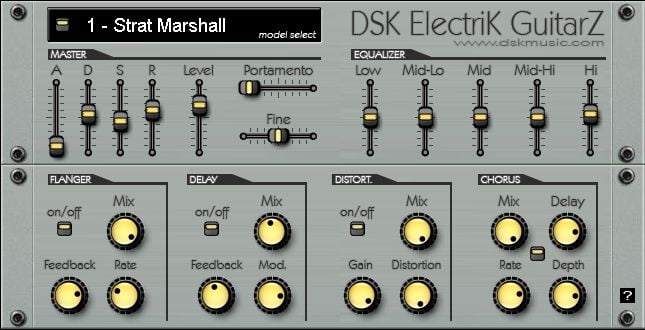
DSK Music releases DSK ElectriK GuitarZ
DSK Music has released DSK ElectriK GuitarZ, a freeware VST instrument for Windows PC.
DSK ElectriK GuitarZ features
- 10 Electric guitars models.
- Amp. envelope, finetune & portamento control.
- 5 band equalizer.
- 4 Effects: Flanger, Delay, Distortion & Chorus.
- Midi automation.
- Velocity response.
You can download DSK ElectriK GuitarZ below (10.5 MB).
DSK ElectriK GuitarZ Downloads: 48724 times
Note: DSK ElectriK GuitarZ bundles some SoundFonts freely available into one instrument. If you’d prefer to get just the SoundFonts, check here.



Thanks for your support!
commented on Nov 13, 2008
Dear gentlemen.
I would warn that the plugin DSK Electrik guitar is not working.
I look back. Thanks Roberto
commented on Nov 13, 2008
Hi Roberto, at almost 6000 downloads I can assure you this plug-in is working fine for most people.
That doesn’t mean it’s not working for you, so could you provide me with some details i.e. what VST host are you using?
commented on Nov 14, 2008
Hello Ronnie.
I’m using software Reaper 2.53 with sequencer and all other plugins are working.
Today I re lowering the DSK Electrik guitar, for another test after several attempts.
Thank you for your attention.
Roberto
commented on Nov 14, 2008
Hello Ronnie,
Thank you.
Roberto
commented on Jan 17, 2009
I also put the Electrik GuitarZ in my VST folder, and it will not show up when I try to load it into a track.
It just isn’t in the list of VSTi’s.
I’ll try it in SONAR, but I’m guessing the same thing will happen.
commented on Jan 17, 2009
Same thing with FL Studio, but it actually DOES show up in SONAR HS6.
Not in Reaper 2.54
commented on Jan 17, 2009
in fl studio you need to “refresh” the plugins list.
click on “channel” , “add one” , “more…” and oush the refresh button at bottom window.
commented on Feb 25, 2009
it will open up into fl studios, when you first download it and extract it, you have to manually copy and paste it into the VST files in C:\Program Files\Image-Line\FL Studio\Plugins\VST
then open up fl studios and right click on a instrument bank/channel and go to insert/more…
refresh your list and it should be in the list.
commented on Mar 20, 2009
I couldn’t download zip file properly with internet explorer, trying all options, but it downloaded fine with firefox.
I hope this works well with FL Studio 8 XXL, I really needed better guitar tones, thanks.
commented on Sep 09, 2009
Heads up Boss …
File size on site says (9.3 MB).
File linked to says (10.5 MB )
????
I’ve noticed this type of difference on several files.
Might want to cuclye thru you links and check this out ?
commented on Sep 09, 2009
Thanks Gene, this one is a mistake. The download was updated a few weeks after the initial release and I probably forgot to edit the file size indication. Fixed that.
