

rekkerd.org - download high quality creative and original royalty-free samples and loops and keep informed about the latest VST plug-ins and software

DSK releases AkoustiK GuitarZ

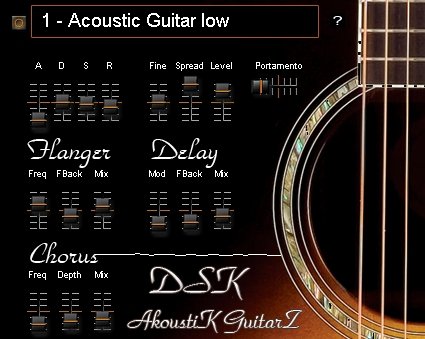
DSK AkoustiK GuitarZ

DSK Music has released AkoustiK GuitarZ, a freeware VST instrument for Windows PC.

AkoustiK GuitarZ features

  • 4 acoustic guitar types.
  • Amp. envelope and fine tuning.
  • Stereo spread and portamento.
  • 3 effects: Flanger, Delay & Chorus.
  • Velocity response.

Download AkoustiK GuitarZ below (3.1MB)

DSK AcoustiK GuitarZ Downloads: 8118 times

Visit the DSK VSTi page for more freeware plug-ins.

12 Comments

  1. Vic commented on Aug 02, 2008

    I’ve tried to download Accoustic GuitarZ several times over the last week and each time it’s been unzipped I get a file damaged or file corrupt error message .Can you help please?
    Thanks
    Vic

  2. ronnie commented on Aug 02, 2008

    Hi Vic, are you using a download manager? If so, try without (i.e. right-mouse click and save as…)

  3. Vic commented on Aug 03, 2008

    Hi ronnie,
    Thanks for your comment.I don’t use file managers so that’s not the problem.I’ve also tried right click and save as, but I get the same result on unzipping the file. I tried downloading another DSK file and got the same result. I then downloaded a couple of files from another site and there was no problem when they were unpacked.Went back to DSK and downloaded the guitarz file again incase there was some sort of glich and got the same corrupt error messages. I hav’nt got a clue what else I can do. Can you help please.
    regards.
    Vic

  4. ronnie commented on Aug 03, 2008

    No idea really, I’ll contact you by email and sort things out.
    Cheers,
    Ronnie

  5. Aser commented on Aug 17, 2008

    Hey When i download it and unzip it only shows a .Dll file and a read me filer … please help :)

  6. ronnie commented on Aug 17, 2008

    @Aser: That’s right. You’ll need a host to use the VST plug-in.

    Check this wiki page to learn more about VST.

  7. lol wut commented on Aug 17, 2008

    @ASER
    lol, what?

    try reading the README that’s there.

    also, copy the dll to your music program’s VST or VSTi folder.

  8. Aser commented on Aug 18, 2008

    I downloaded Reaper what shall I do now to use the AcoustiK ?

  9. ronnie commented on Aug 18, 2008

    In Reaper you can add a new track with a VST plug-in. Check the Insert menu for “Insert virtual instrument on new track”.

    Also, more info on how to add VST’s etc. in the manual.

  10. Aser commented on Aug 18, 2008

    that was quick Roonie , thanks again :)

  11. Aser commented on Aug 18, 2008

    SOrry but where shall I put the .Dll file ?

  12. ronnie commented on Aug 18, 2008

    In the VST path as defined in REAPER. Check here: http://www.cockos.com/wiki/ind.....ing_a_VSTi

Leave a comment

Comment notes:
Please keep comments relevant. Inappropriate or offensive comments may be edited and/or deleted. Email addresses are never displayed. Line breaks and paragraphs are automatically converted - no need to use <p> or <br/>.

* Your email address will not be published.

Keep reading
