

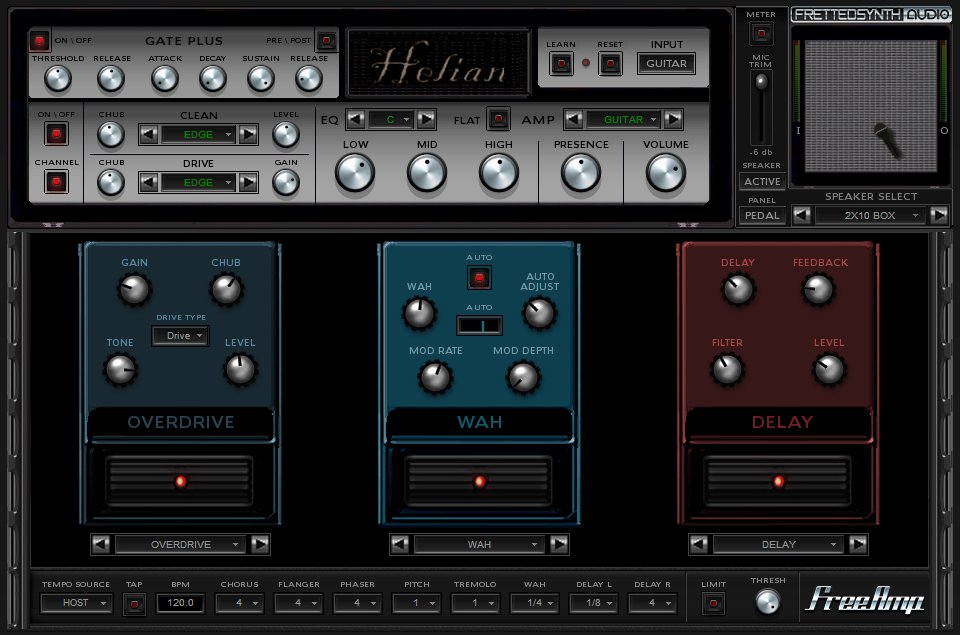
FrettedSynth releases FreeAmp3
FrettedSynth has released FreeAmp3, a freeware virtual guitar setup plug-in for Windows PC.
FreeAmp3 features
- 5 Clean amps.
- 19 Drive amps, Provides clean/drive amp switching.
- 5 Amp equalizers.
- 2 Power amps.
- 17 Speakers, including 4 bass cabs.
- 3 Effect slots both pre (mono) and post (stereo) amp positions.
- Noise gate and output Limiter.
FreeAmp3 comes in both an amp only version and a FX full version.
Visit FrettedSynth for more information and a link to download FreeAmp3.

u-he releases More Feedback Machine v2.0
db audioware releases Flying Haggis


Thanks for your support!
commented on Jan 07, 2008
works great! and all this is for free… amasing :)
great sounding (better than the 2)
a must
commented on Jan 08, 2008
Hi guys..
Can anybodytell to me about this FreeAmp3, does it work on its own on a computer? Like, if you don’t have a recording package on the computere can you using this amp on his own and say just run the sound out of the headphone or speaker socket?
Muchas gracias!
commented on Jan 08, 2008
Hi Jey, you’ll need a VST host to use this plug-in.
There are some free options like: Cantabile Lite, or VSTHost.
You load the FreeAmp3 .dll file (which is the VST plug-in) as an effect in these hosts to use it.
commented on May 28, 2008
Response to “Jey De Luca”…
Yes, download SAVIHOST…tool to open exactly 1 VST Plugin…here is the link…
http://www.hermannseib.com/programs/savihost.zip
Great little program…Save it to any handy Folder…copy and paste into the same folder as your plugin…then rename the savihost.exe to the name of the plugin.exe..
Example: If the plugin is called Freeamp3, then rename savihost.exe to Freeamp3.exe
Then, open, set your buffer and samples to whatever your soundcard can handle…plug in the gutar and have a blast!!!
commented on Jul 15, 2008
works great! i use it with krystal
commented on Dec 14, 2008
OK, I’m going to add a little newb action to this post here. I have the Freeamp widget along with the VSTHost. I have figured out how to make it record with ASIO4All. But the thing I have been after is to use my computer as an AMP. Is that the intent of this software? recording is all nice and nifty but I would like to just play my guitar through these virtual effect pedals and listen while I play. Am I way off base here or what!
Thanks!
commented on Dec 15, 2008
Hi Michael,
Your instrument should have sound in your host (i.e. VSTHost) first. If you manage to get that it should also be possible to use FreeAmp with that host by inserting it as an effect plug-in.
commented on Dec 15, 2008
Really! OK. Would you mind telling me how you have yours set up in devices? In [Device] –>[Wave] I have just the output set to ASIO4All. This allows me to record, but I don’t hear a peep from my Computer. What do you have for input and output?
thaks Ronnie!
commented on Dec 15, 2008
But are you getting any sound from the input without FreeAmp loaded? If not, check your input settings.
I’m not very familiar with VSTHost but it’s very easy in Cantabile Lite.
commented on May 19, 2009
hey im having problems with the devices, i connect my guitar and it works but its just a clean effect, even when i turn the effects on. i have it as a line in input but how do i select it as an input in the program?
