

Matthew Lindsay NCL EQ

Related: , , , , // Posted in news on May 27, 2009
Matthew Lindsay NCL EQ

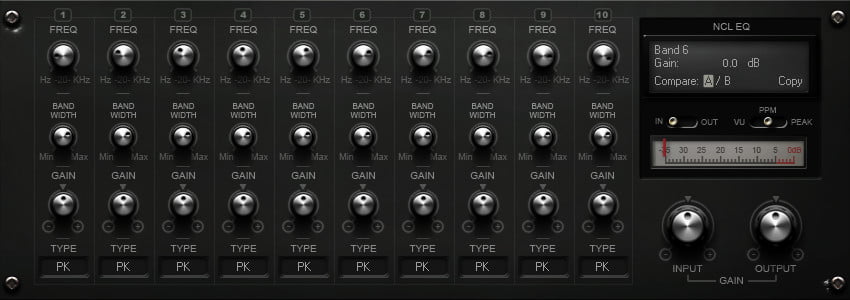
Matthew Lindsay has released NCL EQ, a flexible high-quality 10 band parametric equalizer plug-in.

It’s designed to be clean, precise and to minimise digital artifacts such as frequency warping. Uses include mixing, tracking, and mastering.

NCL EQ features

  • 64 bit internal precision.
  • Oversampling of the high bands.
  • Selectable filter types.
  • AB to quickly compare settings.
  • Adjustable meter ballistics.
  • Key commands for quick editing:
    • – Control left click zeros gain controls.
    • – Holding alt increases knob stiffness.
    • – Holding shift allows fine tuning of the frequency control in steps of 100 Hz.
    • – Holding shift+tab allows fine tuning of frequency in 1 Hz steps.

NCL EQ is available as a freeware VST effect plug-in for Windows PC.

Note: NCL EQ was made in synthedit, but all the DSP and a large section of the GUI uses custom modules coded in C++

Download it below (1.51 MB).

9-Nov-2009: updated NCL EQ to version 1.1 – Improved multi-core support and reduced file size (same download link below)

NCL EQ Downloads: 9174 times

Related posts

Comments

There are 17 comments on this post.
Join the discussion and share your thoughts below.

Comments

  1. error on download
    commented on May 28, 2009

    download fails……..

    Parse error: syntax error, unexpected T_STRING in /home/rekkerd/www.rekkerd.org/index.php on line 13

  2. ronnie
    commented on May 28, 2009

    Sorry about that, things should be back up.

  3. Dom
    commented on May 30, 2009

    Efficient et nice looking EQ: BRAVO!
    Just one big “regret”: I’m working both on winXP and macOSX and I like to have the same plugs on all my computers.
    I think I don’t be alone in this situation.
    So, do you develope a OSX version for the future?

    “Encore bravo!”

  4. NIKOS THEODORAKIS
    commented on Jun 02, 2009

    thanks

  5. UDMR
    commented on Jun 04, 2009

    I think your EQ is very powerful and good. However despite the very nice looking user interface I find myself wishing it were more “friendly”. Everything looks too much the same so I can’t get a sense of my settings “at a glance”. Ideally a graphic representation of the curve would be great, but even something simple like knobs that showed their positions with more clarity would be nice. Also the filter settings at the bottom could be better represented. Overall a good plugin, but I find myself fiddling too much because gui is too opaque.

  6. Nekro
    commented on Jun 04, 2009

    Matt has done a great job with this EQ, it makes you use your eyes more than your eyes to mix oppose to your typical paragraphic EQ and it is a plug-in i have been using for ages (since first beta version). It is great on the CPU and as it says in the release is suitable for any EQ tasks plus more as there are band reject filters in their also and i have had some great results with some of them placed both pre- and post- a more regular peak, Low & High Shelving filter and bandwidth tweaking.

    Another awesome piece of quality freeware in the land of VST

    NCL EQ is highly recommended > don’t take my word for it as you can try it for yourself for gratis :)

    Nice one Matt and thanks for hosting Ronnie

    Nekro or Dean if you prefer ;)

  7. Cheddar Man
    commented on Jun 05, 2009

    I agree with NEKRO. This is a quality, versatile EQ.
    Makes a great all-around workhorse!

  8. Dave McIsaac
    commented on Jun 06, 2009

    I just downloaded Matt L’s NCL EQ last night and can’t change the “selectable filter types”. What’s the trick? All I’ve got are PK filters on all 10 bands. Any help out there?

  9. ronnie
    commented on Jun 06, 2009

    Dave, try left-mouse clicking on the PK and drag up/down to check the filter type.

  10. Matt L
    commented on Jun 12, 2009

    Hi everyone, thanks for all the feedback :)

    DOM: Sorry the chances of a mac version are slim to none. Though I coded the DSP algo myself the dll is compiled with synthedit, which is windows only. At somepoint I might update this to native VST, but even if I do this I don’t own a mac. I’m not sure the extra hassle of supporting multiple platforms would be worth it from my point of view as this is free-ware.

    UDMR: At the moment there are no plans on changing the GUI. Maybe at somepoint, but don’t hold you’re breath.

    NEKRO: Thanks for the presets. I got back yesterday and I’m going to look at adding these to the next update.

  11. I love this plug-in and the GUI is beautiful. I was just thinking that you sould do a version of the 4Front W1 Limiter like the Betabugs did but with this GUI. I hate the Betabugs version and the 4Front version is just the code for the function and borrows the gui from the software host. Anyways I’m working on some really original ideas for plug-ins so please send me an E-Mail so I can contact you of future ideas that I have. I have an idea for a genius vocal compression that is different from anything availible.

  12. I also have an idea for a genius vocal eq.

  13. Corey Scott
    commented on Jul 24, 2009

    Download link not working.

  14. Denol
    commented on Jul 24, 2009

    Great!

  15. Tor
    commented on Feb 04, 2010

    Im experiencing that NCL eq loose the settings after I save and reopen a project in Cubase Essential 5. Is this a bug in the eq or in Cubase? Anybody have the same experience?

  16. Matt L
    commented on Feb 04, 2010

    It’s saving settings on my system. I’d be interested to hear from other people as well.

  17. eduardo Rubio
    commented on Feb 09, 2010

    Ya i’m experiencing the same problem. Its especially notable when I try and use the read/write automation. If I reopen the plugin settings I lose all the buttons positions and it doesn’t seem to want to save my presets either.

Leave a comment

Comment notes:
Please keep comments relevant. Inappropriate or offensive comments may be edited and/or deleted. Email addresses are never displayed. Line breaks and paragraphs are automatically converted - no need to use <p> or <br/>.

* Your email address will not be published.

